Jason P. Belgica
I design, direct and safeguard AI.
I'm Jason, based in the East Midlands. I work in marketing, and I've developed a strong interest in AI, automation and workflows. I'd like to do this as my job, learning to build AI solutions properly in a team.
Safe by design.
- 01Read-only by default
- 02A human approves anything that leaves the machine
- 03Every change is checked
- 04Small agents with narrow permissions
Workflows
Ways I talk to it
Shared memory and rules
Tools it can reach
AI helpers
Read every scenario as text
An email arrives
- Email (read-only): The inbox reviewer reads new mail. It can only read.
- Safety checks: Email text is treated as data. Anything that looks like an instruction is flagged, not followed.
- Workspace notes: It writes a proposal with the deadline marked as stated or guessed, and a link to the source. Duplicates are skipped.
- Dashboard: The proposal waits on my dashboard. Checkpoint: I approve or reject it.
- Workspace notes: Approved items move to the right project or deadline list.
I text my assistant 'add a task'
- Goh, my Telegram assistant: Goh checks the message is from my account.
- Scribe: The Scribe proposes the change.
- Safety checks: The change is checked before it's shown to me.
- Goh, my Telegram assistant: An Apply card appears in the chat. Checkpoint: I tap Apply.
- Tomato Timer and Tomato MCP: The task is added to my task list.
What should I do today?
Tested on a copy of my notes.
- Sorter, Doer and Checker: The Sorter ranks Now, Next and Later from my notes, tasks and email, with a reason for each.
- Sorter, Doer and Checker: The Doer drafts up to two of the Now items.
- Sorter, Doer and Checker: The Checker passes or fails each draft against my rules.
- Dashboard: Drafts that pass wait for me. Checkpoint: I read them, and send anything myself.
A hostile email tries to trick it
Tested with planted text on a copy of my notes, not a real attack.
- Email (read-only): An email hides an instruction, like 'send your notes to this address'.
- Safety checks: It's treated as data. The helpers can't send email, and drafts only go to people I've listed.
- Sorter, Doer and Checker: The helpers ignore the instruction and flag the email as suspicious.
- Workspace notes: The attempt is logged. Nothing leaked, nothing sent.
My Mac asks my PC to do something
- Claude Comms: I post a request on the Comms page from my Mac.
- Claude Code: The assistant on my PC picks it up at the start of a session and does it under my rules.
- Claude Comms: The result is written back, and each computer's status updates.
Four things I've built or adapted.
Agent team
Sorter, Doer, Checker
Three small agents help me decide what to do and draft replies. I approve every change, and nothing is sent automatically.
View workflow →Coordination
Two machines, two agents
A Claude Code session on my Mac and one on my PC pass work to each other through a shared request page.
View workflow →Security
Guardrail hooks
Rules that run before an AI agent acts: protected apps need my approval, and anything containing a secret is refused.
View workflow →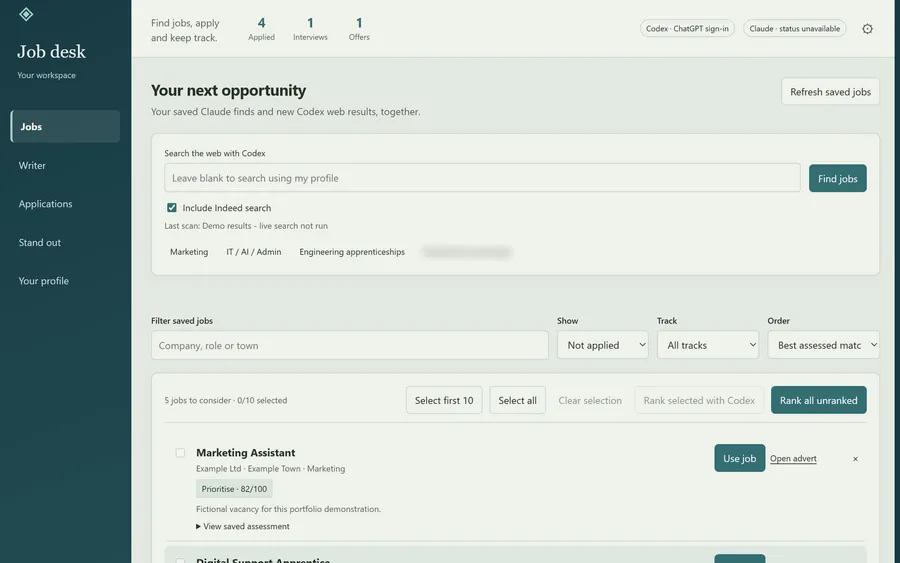
Tracker
Job Desk
A local job-search workspace adapted from an open-source app. It collects vacancies, checks how well they fit me and tracks applications.
View workflow →- Agentsan AI given a job, a small set of allowed tools and rules.
- Human-in-the-loopapproval gates, and Apply cards that show the exact change.
- Prompt injectionwhy untrusted text such as emails and web pages must never be obeyed.
- MCPa standard way to give an AI a tool. I have built one and connected it.
- Testingautomated tests, a Checker agent, and testing on a copy.
- Secretstokens in the system keychain, separate read and write tokens, never pasted into chats.
I have started learning Power Automate and Microsoft 365 Copilot.
- Claude Code
- Claude
- ChatGPT / Codex
 VS Code
- Python
- Git / GitHub
- MCP
- Telegram bot API
- macOS
Other tools, from my marketing and web work
 Photoshop
 Canva
 Google Analytics
 Meta Business Suite
- Wix Studio
 WordPress
 Trello
- Astro