MCP server
Tomato MCP
A small MCP server that lets an AI app such as Claude read and update my Tomato Timer task list.
- Step 01
AI app
Tested with Claude Desktop and Claude Code.
- Step 02
Tomato MCP
A small MCP server with four tools: get_context, list_tasks, add_task and update_task.
- Step 03
GitHub API
Reads and writes one task file in a private repository.
- Step 04
Tomato Timer
Changes show up on the next sync, and the other way round.
MCP is a standard way for an AI app to use outside tools. An AI app can get a short snapshot of today's tasks, list tasks, add a task to Today or Later, and mark one done, move it, star it or rename it.
It is a Python server (3.10 or newer, MIT licence). I built it with Claude Code. I decided what it should do, reviewed the work and tested it. I did not write it from scratch.
Guardrails
- It never deletes tasks, and only changes the rows it edits.
- It uses a token limited to that one repository. Read and write use separate scoped tokens.
- If the app saves at the same moment, it reloads and tries again instead of overwriting, up to three times.
Honest outcome
Three automated tests that run without a network connection or a real token. It runs on the computer where it is installed. A hosted version for web-based AI apps does not exist yet.
How it connects
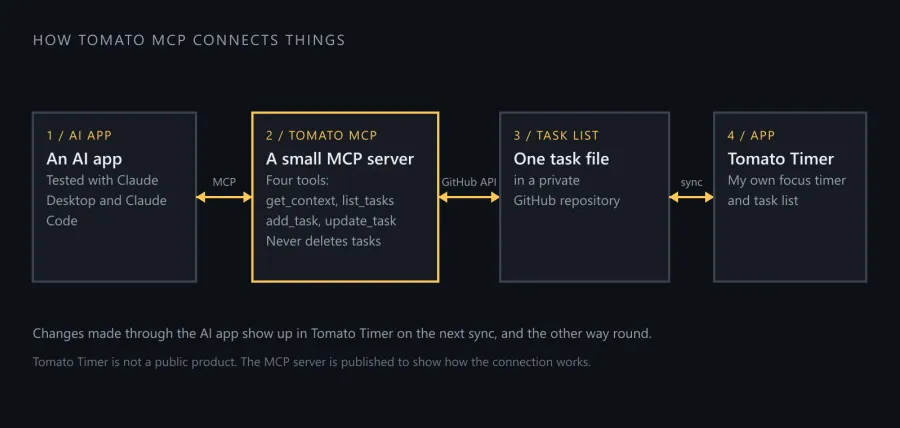
How Tomato MCP connects an AI app to my task list. Drawn from the project's public README.